Be yourself; Everyone else is already taken.
— Oscar Wilde.
This is the first post on my new blog. I’m just getting this new blog going, so stay tuned for more. Subscribe below to get notified when I post new updates.
Be yourself; Everyone else is already taken.
— Oscar Wilde.
This is the first post on my new blog. I’m just getting this new blog going, so stay tuned for more. Subscribe below to get notified when I post new updates.
Created functions are user-defined functions. Thats means that the user created the function by him self and it is not provided by the program language or the environment.
The syntax to create a functions is the following:
def functionname( parameters ):
    "function_docstring"
    function_suite1
function_suite2 ...
return [expression]
functionname is the name of the function by which it will be called in the program.parameters are the parameters which the function will expect. Important is the order in with the parameters will be given over. The function expects the parameters in the same order as it is defined."funcrtion_docstring" is optional and describes the how the function is supposed to perform. It can be understand like a comment.function_suite’s are responsible for the task of the function. A function can have more than one function suite.return [expression] is the last statement in a function. It sends an execution control back to calling the environment. If there is an expression added it will be returned as well.
Take a closer look at the following example. The following function calculates the average mark (from 0 to 100) of a student and tells if he/she passes the semester or not.

The created function studentsfuture takes three marks (math, English and art) and calculates the average (av) of them. If av is bigger or equal 70, the students has passed and gets the appropriated message printed including the average.
If av is smaller than 70, the students has not passed and the program tells him/her this including the average as well.
To call the created function it is needed to write the name of it (line 24). In the brackets are written the variables, in this example the student’s marks.

Since it is defined in the definition line that the order of of the marks is „math,english,art„, this is the exact order the the function expects the variables to be in.

However, it is possible to enter the variables in a different order. Therefore it is needed to clarify the variables and its values in the brackets when calling the function:

Fun fact: if there are two created functions with the same name only the second one is executed and printed.

Most programing languages have a set of functions available that the user can us without the need to program it himself. But the user can also define and use his own functions. Important to know is that in Python functions are treated like objects. This way they are way more flexible. As already mentioned, there are types of functions:
build-in functions and user-defined functions.
Build-in functions are prepared functions for the user. The user can use them just by calling them. One very simple example for a function is print(). This function just takes the input and prints it in the console:

Build-in functions are also changing the type of an object like int() or float(), as well as to ask the type with object with type(). All of those are build-in functions. A list with some of the most important build-in functions are in the screenshot below. The link the the list is enclosed as well.

Some functions are already defined but not always available for the user. They need to be imported before they can be used. A simple example for a set of pre-defined functions is math. This package has a punch of defined functions like sqrt() (square root), log() (logarithm) or pi (Pi = 3,1415….). This functions need to be imported with import to save memory because they are not always used.
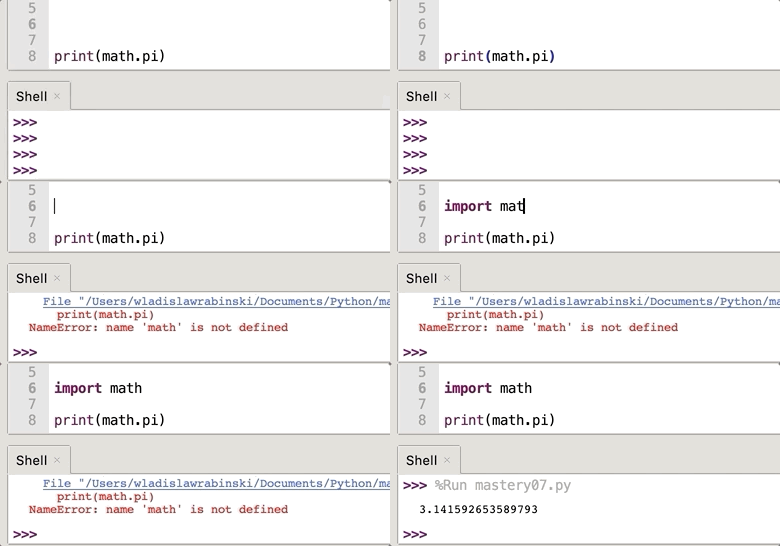
To use one of the imported functions it is important to refer to the imported package. In this case it is needed to write „math.“ in front of pi.
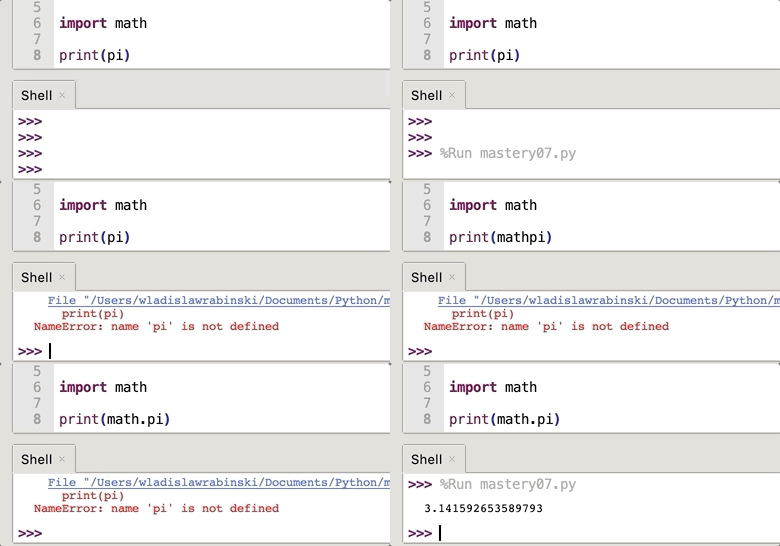
User-defined functions are functions made by the user himself. The syntax for a new function is the following:
def functionname( parameters ):
    "function_docstring"
    function_suite1
function_suite2 ...
return [expression]
functionname is the name of the function by which it will be called in the program.parameters are the parameters which the function will expect. Important is the order in with the parameters will be given over. The function expects the parameters in the same order as it is defined."funcrtion_docstring" is optional and describes the how the function is supposed to perform. It can be understand like a comment.function_suite’s are responsible for the task of the function. A function can have more than one function suite.return [expression] is the last statement in a function. It sends an execution control back to calling the environment. If there is an expression added it will be returned as well.
In the following example the function myfunction is created and executed:
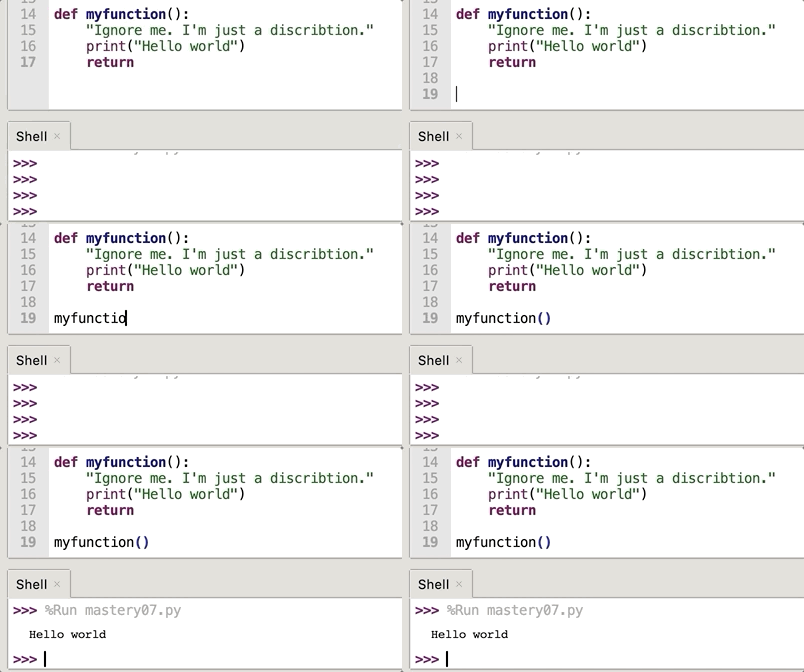
In this example no parameters are passed. To handle in a parameter, it is necessary to write the parameter name in the brackets.

It is also possible to enter an already existing variable into the defined function. The variable needs only to be defined. In the following example the variable is name1:

Helpful sources:
https://www.tutorialsteacher.com/python/python-user-defined-function
https://www.tutorialspoint.com/python/python_functions.htm
Not all programs can proceed on their own. Some need input form the user to do the job, for example the name, birthday or email address. In Python a basic user input can be realized using the input function.
The syntax of input is the following:variable = input('text for the user')
When the machine is executing this function, the user will be asked to insert an input before finishing the program.
To illustrate it, look at the example below:

You can see that the user is forced to enter a text into the console (here „hello world„). The program puts this input into the variable a. The print function shows it. Also, if it is not specified, input gives the input the type string (also shown in the example above).
If it is needed that the input is a different type, let’s say integer, it has to be determined in the code. In the example below the input is defined as an integer:

This time the variable a gets the value „1234“ is is from type integer. To make the input of the user in a specific type, write the needed type in front of the input function and put it in simple, round brackets. Please consider that if you define the input as an int you are not allowed to enter letters. The program will throw out an error message.
To print out the value of a variable we need the function print(). In the brackets has to be written what shell be printed.

It works with most numbers, int and float. If you want to print a text (string) you need to put them in quotes (double or single).
With print() we can print the content of an object and variables that are already defined.

It is also possible to print more than one output with one single print() function. Just enter all the variables and outputs in the brackets, separated by a comma (,).

print() has even a function to add a separation which contains a set of characters you can choose.

If you want to separate your output and split it in multiple lines, you can do it by using backslash + n (\n) in the text.

(I’m doing „fine“, not „dine“.)
When working with floating numbers it can be very helpful to cut a number with a lot of digits behind the decimal point. A computer can not print out all digits of Pi.
Let’s take Pi as an example. We need only the first two digits behind the decimal point. In Python the format can be determined by the following syntax: '%.2f'%, including the quotes, followed by the number or variable. It says that the float number shell only give out the first 2 decimal numbers.

On this way it is possible to get print the zeros behind the last decimal number. That means that 0.5 becomes 0.50.

Also, with round(…)it is possible to round up a number.

After the variable, separated by a comma, you can determine at which place the number shell be rounded.
Of course there are way more possibilities to output data. But this is a little introduction to this field.
In Python, like every other programing language as well, you can define different types of objects. This is necessary and helpful in many aspects. Through those object the computer understands what the programer or engineer what’s it to do. It can even help to optimize the performance of the program.
People who beginn with programing often don’t understand the concept of the different object types or simply forget that the definition of an object type, resulting in an error message.
In the following lines, I explain the basic object types and how they are used.
In Python are three basic numeric types:
With numeric types a computer can work and calculate.
A number of the type integer (or int) is defined as a whole number without a decimal point. It can be positive or negative.

They are usually used for simple operations or just to count iterations. To convert a number or input as an int, you need to define it like this: a = int(13). Now the computer knows the variable a in an integer with the value „13“.
Another type is the float (or floating points numbers). They can be negative and positive as well.

They are used when you need to quantify something precisely. Especially after dividing two numbers it is not unusual that you end up with a number with a decimal point. But a float can also be a whole number:

With the function b = float(4) you can define that the variable b should be a float. And by the way, with print(type(b)) you can print out the type of a variable (in this case the type of b).
Now, complex numbers are of the form a + bJ, where a and b are floats and J (or j) represents the square root of -1 (which is an imaginary number). The real part of the number is a, and the imaginary part is b. Complex numbers are not used much in Python programming.
Bourse: https://www.tutorialspoint.com/python/python_numbers.htm

String are sequences of digits or characters. They can consist of numeric characters or letters. Also strings are immortal, what means that you can’t change theme once they are defined. Functions like replace(), join(), or split() do not really change the string itself but create a copy of the string and manipulate the copy.

Also, when defining the vales and characters in a string, it is important to put the value in single quotes (' ') or double quotes (" "). There is no difference between them in this context.
The last type I want to show are tuples. A Tuple is a collection of Python objects separated by commas. In someways a tuple is similar to a list in terms of indexing, nested objects and repetition but a tuple is immutable unlike lists which are mutable.The last type I want to show are tuples.
source: https://www.geeksforgeeks.org/tuples-in-python/

In the example above it shows, that i, colors and j are tuples (print(type(…)) method proves it). All values in the tuple can be given printed and used. And it is possible to print one single value of a tuple. Therefore you need to write the position of the needed value in squared brackets ( [ ] ). Don’t forget that the count starts with zero (0).

Those are the most important types you need to know in Python. Of course this list is not final.
The Zen of Python is a set of principles defined from the American software engineer Tim Peter in 1999. Those 19 principles are recommendations for developers and engineers to keep continuity in coding.
The Zen of Python is so fames and important that you can use a little Easter egg in almost every Python environment to show the rules. Type import this in the console and execute the command.

Even tho it is called „Zen of Python“ the most mentioned principles can be applied in almost every programming language.
If you read the principles, you will notice that some of them are reasonable and useful and some are unclear und confusing. Some even seem to be not really serious and meant as a joke. For example the principle number 14:
„Although that way may not be obvious at first unless you’re Dutch.“
This is a reference to the Dutch programer Guido van Rossum, who invented and created Python. Tim Peter left even space for a 20th principle in hope that Guido von Rossum would complete the list – but he never did. Programer have sometimes a strange humor.
But most of the principles are meant seriously and should be implemented.
The 1st one „Beautiful is better than ugly.“ is asking programers and engineers to keep their code understandable. Most try to be efficient and don’t pay attention to how their code looks like. They only want it to work properly. Some one else will have a hard time to understand it.
The rule number 3 „Simple is better than complex.“ and 4 „Complex is better than complicated.„compete each other. First we are reminded that there is always a simple way to a solution. Then we are reminded that it is not recommendable to use simple solutions for complex problems. It may be possible but you will end up with a complicated solution. So it is better to find a complex solution for a complex problem, than a complicated solution, consisting of simple solutions, for a complex problem.
Every principle has its meaning and and its reason of being. But as already mentioned they are no rules everybody is forced to follow. But they make our life way easier and help to us to work together, have a base to communicate on and tire us together as a community.
In every programing language is function to make comments in your code. Those are very important in sense of document your code for other and even your self. Comments help to structure the code, to explain what is going on and and to remember how your code works.
A good structured and commented code can safe a lot of time and money. A responsible programer will always document his code as good as possible. Imagine an old and retired programer leaves the company and has to be replaced by a new, probably younger employee. If the code contains no comments that describe what is going on, the new programer will have a hard time und understand the code. If the code is documented with comments, the new guy will get the functions way faster.
There are two different ways to make a comment in python. The first is using the hashtage (#) symbol to determine a comment. The second is using the three of the double quotes („““) to beginn and another three of them to close the comments.
If you put a hashtag (#) in front of code, the everything in the line, til the end of the line, will be ignored by python.

You can see that the code is grey and will be ignored by python. You can also put your comment in the middle of the line. Only the part after the hashtag will be ignored. The part before the hashtag is still valid and will be run by the program.

The second way to make comments using three double quotes works like this: open the comment with three double quotes („““). If that’s done, all the code is commented out until the very end. If you put a second time three of the double quotes, only the code between those two character groups are commented out.

Developers use comments not only to document their code but also to mute a part of the code, so I won’t be executed.
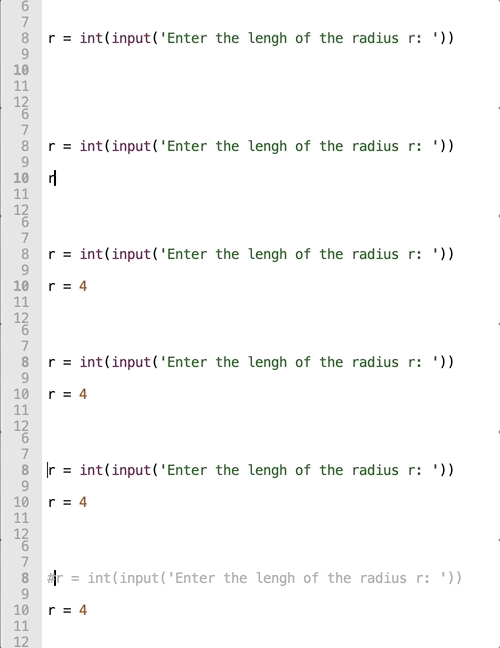
On this way you can test new codes while for example implementing new methods, without having to delete the old ones.
The programs in the screenshot are pretty simple and ideal to beginners.
The first one is suppose to calculate the area of a triangle with the a, b and c. So the user needs to enter the input first before it is calculated. First I used fixed variables but they are commented out.

The second is calculating the area of a circle, based in the radius r the user inserted. It also calculates the volume of the „ball“ based on the radius r.

It’s all very easy. I tried to use backslash and n („\n“) to insert return and skip a lane in the output so it doesn’t look pressed together. And I used the commands because I was too afraid that the new code doesn’t work. That’s how programers do it (I thing).
Things I learnt:
Made my first steps with python using the program „Thonny“. Need to get used to the new syntax of the language. Im used to java and C. But python seems to be a little easier (at least for beginners).
It’s not much but it’s honest work.

I would like to upload the file, but WordPress doesn’t allow me to upload a .py file, nor a .zip, nor a .txt.
Using editor: Atom (but it may change during the course).
Python: installed. But first time on a Mac.
Block: obviously created. Hope it’s public. Never had one.
GitHub: already installed. I also should have a user account.
Hypothesis.si: account created.
Homework: submitted (but 5 min too late. we can’t have it all)

 TC1017